Zelanto: The Elegant Script Font for Timeless Design
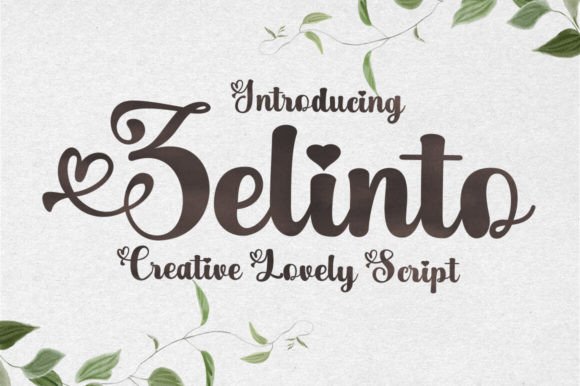
When you are designing a wedding invitation or a high-end business card, the difference between a generic look and something truly memorable often comes down to a single detail: the typography. Zelanto is a stylish and incredibly elegant script font that brings a handwritten touch to digital and print projects without feeling forced or overly casual. It captures the fluidity of a calligrapher's pen while maintaining the structural integrity needed for professional work.
Many designers rush to download a script font because they need an immediate solution for a project deadline. While this urgency is understandable, it often leads to choices that compromise the overall quality of the design. Before you commit to using Zelanto in your next layout, it is essential to understand not just how beautiful it looks, but how to use it correctly to avoid common pitfalls that can ruin even the most expensive-looking templates.
The Allure of Handwritten Elegance
Why do so many professionals gravitate toward scripts like Zelanto? The answer lies in human connection. In a world dominated by rigid sans-serifs and blocky serifs, a script font introduces warmth and personality. It mimics the imperfections of a real hand, which makes the viewer feel as though a specific person wrote the message personally. This is why it looks stunning on wedding invitations, thank you cards, quotes, greeting cards, logos, and business cards.
However, elegance is a double-edged sword. If used incorrectly, what was intended to be sophisticated can quickly appear cluttered or difficult to read. A common mistake beginners make is assuming that because a font is "script," it should be used for all text elements. You might see someone try to set a long paragraph of body copy in a flowing script, thinking it will add character. Instead, this creates visual fatigue and reduces legibility significantly.
Always remember: Scripts are best reserved for headlines, accents, and short phrases. They act as the jewelry of your design, not the foundation. When applied to large blocks of text, the eye struggles to follow the baseline, causing readers to skip over important information entirely.
Pitfalls in Downloading and Licensing
Before you even open your design software, there is a critical step that many overlook: licensing. Because fonts are intellectual property, downloading Zelanto from unauthorized sources can lead to legal issues and technical problems. Unofficial versions often lack proper kerning pairs, meaning the spacing between letters may be erratic. You might find that the "a" and "t" in "at" collide awkwardly, or that ligatures (special character combinations) are missing.
This oversight affects the professionalism of your final output. A client or guest looking at a blurred or poorly spaced invitation immediately loses trust in the brand or the event organizer. To ensure efficiency and quality, always purchase or download the font from reputable marketplaces or the official foundry. Check the license terms carefully to see if you are allowed to use the font for commercial purposes, such as client logos or printed merchandise.
If you are a freelancer or small business owner, investing in a legitimate license protects your reputation. It ensures that the font files are clean, fully supported across different operating systems, and include all necessary variants like italics or bold weights if available.
Misunderstanding Scale and Weight
One of the most frequent errors in applying Zelanto involves getting the scale wrong. Because script fonts have intricate details and varying stroke widths, they behave differently than standard typefaces. A size that looks perfect on a computer screen might become illegible when printed on a small business card. Conversely, scaling it up too much on a poster can make the delicate lines look thin and fragile.
To avoid this, always test your design at 100% scale before finalizing. Check how the fine hairlines hold up against the background color. If you are using Zelanto for a logo, ensure that the negative space between the strokes remains clear. Crowded details can blur together when the image is resized for social media thumbnails or mobile screens, destroying the aesthetic appeal.
Consider the context of your medium. For a greeting card, you have more room to play with smaller details. For a billboard or a website header, you need bolder weights and larger sizes to maintain impact. Don't let the beauty of the letterforms distract you from the practical reality of where the design will live.
Pairing and Contrast Issues
A stylish script font like Zelanto demands a partner. The biggest mistake creators make is pairing it with another decorative font or a serif that competes for attention. When two ornate typefaces fight for dominance, the result is chaotic and confusing. The viewer does not know where to look first, and the message gets lost.
The golden rule of typography is contrast. Since Zelanto is fluid and organic, it pairs exceptionally well with clean, geometric sans-serif fonts or classic, sturdy serifs. These neutral companions provide a stable stage for the script to shine. For example, using a crisp sans-serif for the address on a wedding invitation allows the Zelanto script to take center stage for the names and the date.
Here are a few principles to keep in mind when selecting a pairing:
- Keep it simple: Limit your design to two distinct typefaces.
- Contrast the mood: Pair the romantic flow of Zelanto with a modern, structured font.
- Check the x-height: Ensure the height of the lowercase letters in your secondary font complements the script without overpowering it.
Evaluating Readability and Accessibility
In the pursuit of style, accessibility is often the forgotten variable. While Zelanto is undeniably beautiful, it is not designed for maximum readability in every scenario. If you are creating content for a broad audience, including those with dyslexia or visual impairments, relying solely on script fonts can create barriers.
Always evaluate your design through the lens of clarity. Is the text easy to scan? Does the color contrast meet accessibility standards? A beautiful invitation means nothing if the recipient cannot read the venue address due to low contrast or overly tight tracking. Use strong emphasis only where necessary, and never sacrifice function for form.
If you are designing for the web, consider how the font renders on different devices. Some older browsers may not support certain OpenType features that Zelanto relies on for its smooth curves. Testing across multiple platforms ensures that your elegant design looks just as good on a smartphone as it does on a desktop monitor.
Practical Steps for Success
To get the most out of Zelanto, adopt a methodical approach to your workflow. Start by defining the purpose of your project. Are you aiming for a vintage feel, a modern minimalist look, or a romantic theme? Once you have a clear goal, select your primary and secondary fonts. Install the font correctly in your system, ensuring that any previous corrupted versions are removed.
When laying out your design, use guidelines to keep your alignment consistent. Scripts can be tricky because their baseline often shifts visually. Use tools in your design software to lock baselines and ensure that the text sits evenly on the page. Finally, proofread everything twice. A single typo in a script font can look particularly jarring because of the unique shapes of the letters.
By avoiding these common mistakes and focusing on balance, scale, and proper licensing, you can harness the full potential of this elegant tool. Whether you are a seasoned graphic designer or a hobbyist creating custom gifts, understanding the nuances of Zelanto will elevate your work from good to exceptional.